mobileOK Checker

mobileOK

W3C provides a mobileOK checker to perform various tests on a Web Page to determine its level of mobile-friendliness. The tests are defined in the mobileOK Basic Tests 1.0 specification.

The checker is based on the open source mobileOK checker library developed by the Mobile Web Best Practices working group.

The mobileOK checker is part of the MobiWeb2.0 Project and of W3C Quality Assurance Tools.

mobileOK conformance can be claimed using POWDER.

CDN push and pull

A content delivery network (CDN) is a collection of web servers distributed across multiple locations to deliver content more efficiently to users.

There are two population methods  : push and pull.

Pull requires virtually no work on the server side:  URL’s are rewritten to the files by replacing  the server domain name with the CDN’s domain name. The CDN will then apply the Origin Pull technique and will periodically pull the files from the origin (the server). How often that is, depends on how headers have been configured  (particularly the Expires header).

Push requires a fair amount of work at the server side to sync files to the CDN. But you gain flexibility because you can decide when files are synced, how often and if any preprocessing should happen.

Most CDN’s support both origin pull and one or more push methods (for instance Amazon Cloudfront).

Wim Leers published on his website his bachelor thesis about “Improving Drupal’s page loading performance” with a chapter of key properties of CDN‘s.

WebDAV

Last Update : July 1, 2012

WebDAV (Web-based Distributed Authoring and Versioning) is a set of methods based on HTTP that facilitates collaboration between users in editing and managing documents and files stored on servers. WebDAV was defined in RFC 4918 by a working group of the Internet Engineering Task Force (IETF).

The WebDAV protocol makes the Web a readable and writable medium. It provides a framework for users to create, change and move documents on a server.

Resources about WebDAV are available at the webdav.org website.

YUI compressor for Javascript and CSS

The YUI Compressor is a JavaScript compressor which, in addition to removing comments and white-spaces, obfuscates local variables using the smallest possible variable name.

The YUI Compressor is also able to safely compress CSS files. The decision on which compressor is being used is made on the file extension (js or css).

The YUI Compressor is written in Java and relies on Rhino to tokenize the source JavaScript file. It starts by analyzing the source JavaScript file to understand how it is structured. It then prints out the token stream, omitting as many white space characters as possible, and replacing all local symbols by a letter symbol wherever such a substitution is appropriate . The CSS compression algorithm uses a set of finely tuned regular expressions to compress the source CSS file. The YUI Compressor is open-source.

Several GUI’s are available :

Online versions are available at the website of Zileex Media, of  Rodolphe Stoclin and of gpbmike.

WordPress plugin & theme development

WordPress Codex provides a huge documentation for programmers who want to develop plugins or themes for the WordPress Blog program.

WordPress Plugin: A WordPress Plugin is a set of one or more functions, written in the PHP scripting language, that adds a specific set of features or services to the WordPress weblog, which can be seamlessly integrated with the weblog using access points and methods provided by the WordPress API.

Resources :

WordPress Theme : A WordPress Theme is a collection of files that work together to produce a graphical interface with an underlying unifying design for a weblog. These files are called template files. A Theme modifies the way the site is displayed, without modifying the underlying software. Themes may include customized template files, image files, style sheets, custom pages, as well as any necessary code files and scripts.

Resources :

WordPress Templates : Template files are the building blocks of your WordPress site. They fit together like the pieces of a puzzle to generate the web pages on your site. Some templates are used on all the web pages, while others are used only under specific conditions.

Resources :

Color Gamut

CIExy1931

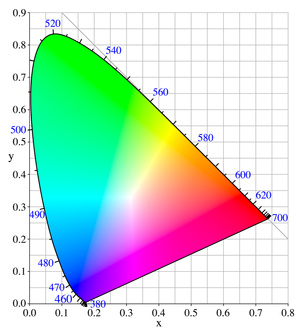
In color reproduction, the color gamut is a complete subset of colors. The most common usage refers to the subset of colors which can be accurately represented in a given circumstance, such as within a given color space or by a certain output device. The term gamut was adopted from the field of music, where it means the set of pitches of which musical melodies are composed.

Generally, the color gamut is specified in the hue–saturation plane, as many systems can produce colors over a wide intensity range within their color gamut; in addition, for subtractive color systems, such as printing, the range of intensity available in the system is for the most part meaningless outside the context of its illumination. When certain colors cannot be displayed within a particular color model, those colors are said to be out of gamut.

While processing a digital image, the most convenient color model used is the RGB model. Printing the image requires transforming the image from the original RGB color space to the printer’s CMYK color space. During this process, the colors from the RGB which are out of gamut must be  converted to values within the CMYK space gamut (gamut mapping).

There are several reasonable strategies for performing gamut mappings, these are called rendering intents. Four particular strategies were defined by the International Color Consortium (ICC), with the following names : Absolute Colormetric, Relative Colormetric, Perceptual, Saturation.

Gamuts are commonly represented as areas in the CIE 1931 chromaticity diagram. The accessible gamut depends on the brightness; a full gamut must therefore be represented in 3D space. Systems that use additive color processes usually have a color gamut which is roughly a convex polygon in the hue-saturation plane.

A list of representative color systems ordered from large to small color gamut is shown hereafter :

  • Laser video projector
  • Photographic film
  • CRT Monitor
  • LCD Monitor
  • Television
  • Painting
  • Printing

An interactive Flash demo explaining color gamut mapping is available at the website of the Stanford University. Gamutvision, an gamut viewer, is available from Imatest LCC (Norman Koren).

Different color spaces have been defined for digital image processing : RGB, LAB, CMYK. The sRGB IEC-61966-2.1 color space was conceived as a multipurpose color space standard for consumer digital devices (s stands for standard in sRGB). Other RGB color spaces are Apple RGB, ColorMatch RGB, ProPhoto RGB, Adobe RGB (1988) and PhotGamutRGB. A comparison between sRGB and Adobe RGB is shown at the website of Cambridge in Colour.

DNG : Digital Negative, camera raw data format

Last update : January 7, 2016

DNG

Digital Negative

Digital Negative (DNG) is an public archival open raw image format owned by Adobe used for digital photography. It was launched in 2004. DNG is based on the TIFF/EP standard format, and mandates significant use of metadata. Exploitation of the file format is royalty free.

Adobe provides the Digital Negative Specification, a free Adobe DNG Converter (version 6.3), which easily translates raw files from many of today’s popular cameras, an SDK (Software Development Kit) and an DNG Profile Editor.

DNG is supported by various camera providers  and photographic software developers (Adobe Photoshop, Adobe Lightroom, …). DNG is also supported by ExifTool, a platform-independent Perl library plus a command-line application for reading, writing and editing meta information in a wide variety of files, developed by Phil Harvey. ExifTool is also available as a stand-alone Windows executable and a Macintosh OS X package. The current version is 10.09 published on January 4, 2016.

Modernizr

last update : 18 January 2012
Modernizr is a small JavaScript library that detects the availability of native implementations for next-generation web technologies. These technologies are new features that stem from the ongoing HTML 5 and CSS 3 specifications. Many of these features are already implemented in at least one major browser. Modernizr tell you whether the current browser has this feature natively implemented or not.

  1. Modernizr tests for over 40 next-generation features, all in a matter of milliseconds;
  2. Modernizr creates a JavaScript object (named Modernizr) that contains the results of these tests as boolean properties;
  3. Modernizr adds classes to the html element that explain precisely what features are and are not natively supported. It allow you to target specific browser functionality in your stylesheet ( if-statements in your CSS ). You don’t actually need to write any Javascript to use it.

I started with version 1.6.  and experienced a problem with Chrome 9 (beta) which was also reported by other people. The current version  2 was released on 1st June 2011.

With the help of the Modernizr library, the website haz.io gives a quick overview of a browser’s support for recent technologies in the world of HTML, CSS and Javascript.


How to make an iPhone web app ?

Tetris web app for iPhone

An iPhone web application (web app) uses Web 2.0 technologies to deliver a focused solution that looks and behaves like a native iPhone application. iPhone web apps run in Safari on iPhone, the unique implementation of Safari that provides full-featured web browsing on iOS-based devices and responds to touch-based gestures.

The Apple Safari Developer / Reference Library provides guides, tutorials, code samples, FAQ’s  and best practices about the creation of web content for iOS devices. The Safari Web Content Guide, the HTML Reference, the CSS Reference and the JavaScript Guide are key documents.

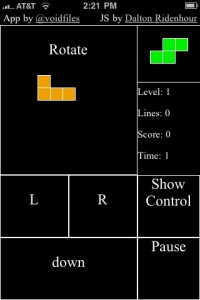
A very useful tutorial about the creation of an off-line Tetris game for an iPhone has been published by Alex Kessinger on the Six Revisions Website. A tutorial about how to install a web app on iPhones has been written by jeshyr on the iTalk Magazine.

There are several tools and frameworks available to build html5/css3 web apps for iPhones or for other mobiles (cross-platforms). A list of a few ones is shown herafter :

  • iWebKit 5 : an outstanding kit with copy and paste elements designed by Christopher Plieger and Johan Van Wilsum to create iPhone web apps.
  • Appcelerator Titanium : an SDK for different application environments. The SDK provides the necessary tools, compilers and APIs for building for the target platform.
  • Sencha Touch : a free HTML5 mobile JavaScript framework that allows you to develop mobile web apps that look and feel native on iPhone and Android touchscreen devices.
  • PhoneGap : an open source development framework for building cross-platform mobile apps with support of core features in iPhone/iPod touch, iPad, Google Android, Palm, Symbian and Blackberry SDKs.
  • Corona : fast and easy development tool for iPhone, iPad and Android games and applications.
  • jQuery Mobile : Touch-Optimized Web Framework for Smartphones & Tablets.
  • iUI: iPhone User Interface Framework
  • Dashcode : part of Apples iPhone SDK

There are also tools and simulators to test created web apps :

  • Bugaboo : an App for debugging web apps on iPhone, iPad, and iPod touch devices, downloadable from the Apple App Store.
  • iPhone  simulator : web browser based simulator

You have to be aware that there are some differences between iPhone native Apps and web apps.

A native App runs code (Objective-C program) on the device and is installable through the App store (if approved by Apple). You have access to all the UI elements the iPhone uses and can do things like 3D which are impossible in the Safari browser. You need a mac to make a native App, but you can make web apps with any platform of your choice.

A web app is accessed via the Safari browser and requires no install. You are just going to a website that has a special stylesheet for the iPhone. Because a web app can also be installed on an iPhone with a custom icon, a custom startup screen, a native look-and-feel and can be used even when the phone is not connected to the Internet, the differences between Apps and web apps are becoming very small.

There are a lot of native Apps that could be run more efficient as web apps. And there are tools to convert a web app into a native App. Make your choice !