
Bing Search Engine owned by Microsoft
Bingis a search engine owned by Microsoft that finds and organizes the answers you need so you can make faster, more informed decisions.
Bing Search Engine owned by Microsoft
Bingis a search engine owned by Microsoft that finds and organizes the answers you need so you can make faster, more informed decisions.
YouTube has three main formats as well as a “mobile” format.
The original format, now labeled “standard quality”, displays videos at a resolution of 320×240 pixels using the Sorenson Spark codec with mono MP3 audio.
“High quality” videos, introduced in March 2008, are shown at up to 864×480 pixels with stereo AAC sound.
In November 2008, HD support was added with a resolution of 1280 x 720 pixels, encoded with the H.264 video codec and the audio AAC stereo codec. At the same time, the YouTube player was changed from a 4:3 aspect ratio to a widescreen 16:9.
In July 2009, YouTube announced that YouTube users can now upload 3D videos. The videos can be watched in the normal way, and glasses are worn by the viewer to achieve the 3D effect.
YouTube accepts videos uploaded in most formats, including .WMV, .AVI, .MKV, .MOV, MPEG, .MP4, DivX, .FLV, and .OGG. It also supports 3GP, allowing videos to be uploaded directly from a mobile phone.
More informations are available on Wikipedia and on YouTube.
Last update : January 30, 2013
Today this contribution has only a historical value.
After YouTube and Google, new players like Metacafe, Blip.tv, Revver, Yahoo Videos and so on have entered the online video sharing space. Today millions of video clips, technology shows, music albums, movie trailers and private films are available on these video sites for online viewing or they can also be downloaded to your hard drive for offline viewing.
The downloaded video files are generally in FLV format (Flash Video) which is an Adobe standard for video compression. It has fast becoming the web standard for delivering online video (replacing Apple QuickTime, AVI, Windows Media and Real rm formats) because Flash Video can be viewed inside Macromedia Flash Players which are shipped by default with most web browsers.
To download Flash Videos, the following approaches are possible:
To record Flash Videos, the following tools are available :
To play Flash Videos on the desktop, use the following players :
To split Flash Videos, use this tool :
To convert and edit Flash Videos, different file conversion programs are available :
To encode and publish :
To captionate Flash Videos, the tools available are :
To extract image frames from FLV Videos :
To embed Flash videos in a webpage :
To play Youtube Videos in a webpage :
To extract audio data from Flash videos :
Links to tutorials about Flash video processing are given below :
Last update : January 30, 2013
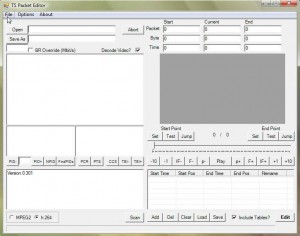
TS Packet Editor
TSPE is a fast, capable, straightforward non-linear Editor and Analyser for transport streams (.ts and .m2ts) – e.g. camcorder, recorded TV, etc.developped by Ventolin. The latest shareware version is 0.815 released on May 26, 2012.
Last update : January 30, 2013
The YouTube APIs and Tools let you bring the YouTube experience to your webpage, application, or device. The Data API lets you perform most of the operations a normal YouTube user can on the YouTube website. The Player APIs let you control the YouTube player using JavaScript or ActionScript. There is not only the wellknown standard basic embedded player, but also a chromeless player that lets you create your own player controls. Widgets and a custom player help you to embed YouTube videos on your webpage, even if you are not a web programmer.
Go to the following link at Leslie’s Artgallery to see an example of the customized embedded YouTube Player.
[HTML1]
Last update : June 12, 2013
VLC Media is the favorite media player for most people because it plays everything they throw at it without problems with the included codecs. VLC can do the following things (see contribution on Instant Fundas) :
VLC Media Player can not cut videos from the GUI, only with the command lines.
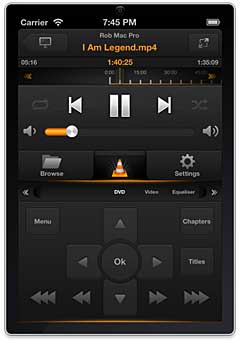
VLC Remote Control for iPhone
After 485 million downloads of VLC 1.1.x versions, VideoLAN and the VLC development team presented VLC 2.0.0 “Twoflower”, a major new release, on February 18, 2012. VideoLAN, a French non-profit organization, is a group of people, that produces and distributes free and open source software for video and multimedia purpose, released under Open Source licenses. It started as a student project at the French École Centrale Paris but is now a worldwide project with developers from everywhere and dozens of millions of people using VideoLAN’s software.
VLC is the official name of VideoLAN’s main product, often named VLC. VideoLAN Client is an ancient name of this product. VideoLAN Server (VLS) is an outdated streaming solution developed by a separate group of people.
The current version of VLC is 2.0.5. It supports now DLNA and works fine with the Serviio DLNA server (see contribution on the Serviio Forum). A remote control for the VLC player to run on iOS devices is available from Hobbyist Software. The log files are displayed in the Tools > Messages window if verbosity is set to the value 2 (debug).
With VLC, cuttingt videos is very easy. Launch VLC media player and activate advanced controls located under the view menu. You will see four extra buttons above the normal play/pause button. You will not cut the video, but rather record the segment using the built-in VLC recorder. First seek the position you want to start your recording with the frame by frame button, then press the record button and the play button. The background color of the record button will change to blue. Press the record button when you want to stop the recording. The clip will be automatically saved as an MP4 media file in your Videos folder in Windows. A prefix “vlc-record-date-time” is added to the name of the original videoclip.
Today I installed a simple database on the Amazon Webservices. Amazon SimpleDB is a web service providing the core database functions of data indexing and querying in the cloud. This service is available in Europe since a few weeks. This allows to achieve lower latency, operate closer to other resources like Amazon EC2, Amazon S3, and Amazon SQS in the EU Region, and help meet EU data storage requirements when applicable.
Simple DB is simple to use, low touch, scalable, highly available, fast, flexible, inexpensive and designed for use with other Amazon Web Services.
The prices are:
When using Amazon SimpleDB, you organize your structured data in domains within which you can put data, get data, or run queries. Domains consist of items which are described by attributename-value pairs. The spreadsheet model shown in the following image explains the structure:
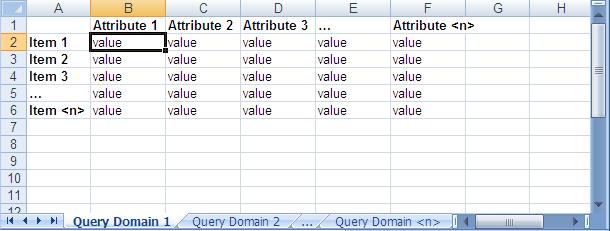
Amazon Simple DB Data Model
Snapatar lets you update your Twitter profile picture using your webcam. Simply snap a picture, fill out your Twitter details and send the new image to Twitter. You can do this as often as you like. Your creativity is the limit.
Snapatar was designed by Roy Tanck, a free lance webdesigner, geek, entrepreneur and WordPress enthusiast from the Netherlands. He is the co-author of the book Byte-size Flash MX which deals with optimizing Flash files. He is also the developer of the FlickR and Photo widgets.
The Internet Society engaged in a scenario planning exercise to reveal plausible evolutions of the Internet in the future. Based upon the two questions :
These two questions defined four quadrants, which led to four very different stories about how the world might develop over the next eight to ten years :
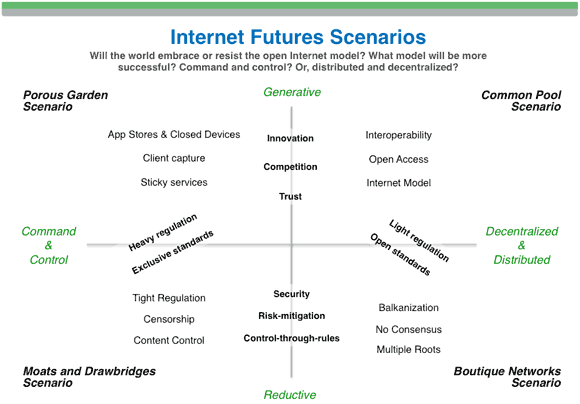
Internet evolution scenarios
All of these stories contain some elements of the Internet of today. The challenge for everyone is to contribute to help the Internet to evolve in a direction like the scenario called The Common Pool.