eyePlorer : the knowledge machine

Last update : August 9, 2013
eyePlorer by Vionto

eyePlorer by Vionto

eyePlorer is (or was) a graphical knowledge engine created by vionto®. Current search engines only present lists of links and documents, with eyePlorer however, you are able to locate relevant information and connections instantly. Facts and relationships between terms and concepts are visualised in an interactive application. The knowledge machines build by vionto® employ sophisticated semantic techniques in order to analyse the meaning of sentences and texts. The benefit for the user is that he or she can work with individual facts instead of just long documents.

The user does not work with documents but with knowledge and facts in a graphical, interactive, almost dialogue-like kind of way. Knowledge is visually arranged in different categories. vionto® knowledge machines are based on semantic analyses derived from cognitive science, brain research and computational linguistics. vionto® relies on a robust language technology platform and sophisticated linguistic resources such as, for example, ontologies and thesauri. Currently eyePlorer processes the English and German Wikipedia as well as MEDLINE/PubMed.

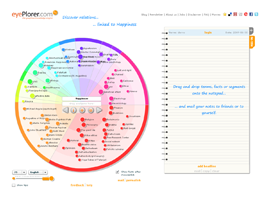
In the circular area on the left hand side eyePlorer presents eyeSpots – these represent terms that are related to a search topic. The exact nature of these connections can be displayed by pointing or clicking on an eyeSpot. A small window, the eyeTip, opens and displays facts that document the relation with one or more facts taken from our knowledge base. The circular area filled with eyeSpots that relate to a certain search term is called an eyeMap. To display connections between eyeSpots just double-click on an eyeSpot – lines will appear between the eyeSpot you clicked upon and eyeSpots that are semantically related. A click on one of these lines will display associated facts taken from the knowledge base.

EyeSpots are associated with various categories (people, countries, organizations, time, society, work, science & technology, …) visualized with different colors. The categorisation is a procedure that is carried out automatically. A double click on an empty area of a category expands it and shows only this category along with all its subcategories.

A dynamic link to eyePlorer can be added to a website to visualize search terms.

vionto® filed for U.S. patent registration of the eyePlorer technology. The eyePlorer visualizes knowledge graphs (k-graphs) derived from various contents that can be interactively explored.

vionto GmbH was founded in december 2008 in Berlin by Ralf von Grafenstein (Diplom-Kaufmann) and Dr. Martin C. Hirsch (neurobiologist and brain researcher). The first version of eyePlorer went online in February 2009 (see Frankfurter Allgemeine Feuilleton : Google-Herausforderer eyePlorer – Die Welt ist doch eine Scheibe) . Several prestigious prizes of the  internet sector have been awarded to vionto® (SUMA award, ECO Intenet award, Red Herring Europe Top 100 2009 Award, …)

However one year later was the end of the prestigious project with the inglorious death by bankruptcy of vionto GmbH (see SpeedX Blog : Verglüht). It was the same destiny as its ancestor semgine GmbH. The successor seems to be medx GmbH (diagnostic reasoning), the url eyeplorer.com is redirected to this site.

Video formats on YouTube

YouTube has three main formats as well as a “mobile” format.

The original format, now labeled “standard quality”, displays videos at a resolution of 320×240 pixels using the Sorenson Spark codec with mono MP3 audio.

“High quality” videos, introduced in March 2008, are shown at up to 864×480 pixels with stereo AAC sound.

In November 2008, HD support was added with a resolution of 1280 x 720 pixels, encoded with the H.264 video codec and the audio AAC stereo codec. At the same time, the YouTube player was changed from a 4:3 aspect ratio to a widescreen 16:9.

In July 2009, YouTube announced that YouTube users can now upload 3D videos. The videos can be watched in the normal way, and glasses are worn by the viewer to achieve the 3D effect.

YouTube accepts videos uploaded in most formats, including .WMV, .AVI, .MKV, .MOV, MPEG, .MP4, DivX, .FLV, and .OGG. It also supports 3GP, allowing videos to be uploaded directly from a mobile phone.

More informations are available on Wikipedia and on YouTube.

Recording and processing Flash (flv) videos

Last update : January 30, 2013

Today this contribution has only a historical value.

After YouTube and Google, new players like Metacafe, Blip.tv, Revver, Yahoo Videos and so on have entered the online video sharing space. Today millions of video clips, technology shows, music albums, movie trailers and private films are available on these video sites for online viewing or they can also be downloaded to your hard drive for offline viewing.

The downloaded video files are generally in FLV format (Flash Video) which is an Adobe standard for video compression. It has fast becoming the web standard for delivering online video (replacing Apple QuickTime, AVI, Windows Media and Real rm formats) because Flash Video can be viewed inside Macromedia Flash Players which are shipped by default with most web browsers.

To download Flash Videos, the following approaches are possible:

To record Flash Videos, the following tools are available :

To play Flash Videos on the desktop, use the following players :

To split Flash Videos, use this tool :

To convert and edit Flash Videos, different file conversion programs are available :

  • SUPER from eRightSoft
  • An free online conversion tool (beta) to PC, iPod and PSP is offered by vixy.net.

To encode and publish :

To captionate Flash Videos, the tools available are :

To extract image frames from FLV Videos :

To embed Flash videos in a webpage :

To play Youtube Videos in a webpage :

  • use the Youtube code (an embedded YouTube watermark logo is displayed in the right bottom corner of the player)
  • Mediaplayer by Jeroen Wijering (LongTail Video) ; an embedded YouTube watermark logo is displayed if the standard URL http://www.youtube.com/watch?v=xxxxxxx is used to respect the terms of service (TOS) of YouTube.  The watermark logo is not shown if  the mp4 url  format http://www.youtubemp4.com/video/xxxxxxx.mp4 is used to play the YouTube videos.

To extract audio data from Flash videos :

Links to tutorials about Flash video processing are given below :

YouTube APIs and Tools

Last update : January 30, 2013
The YouTube APIs and Tools let you bring the YouTube experience to your webpage, application, or device. The Data API lets you perform most of the operations a normal YouTube user can on the YouTube website. The Player APIs let you control the YouTube player using JavaScript or ActionScript. There is not only the wellknown standard basic embedded player, but also a chromeless player that lets you create your own player controls. Widgets and a custom player help you to embed YouTube videos on your webpage, even if you are not a web programmer.

Go to the following link at Leslie’s Artgallery to see an example of the customized embedded YouTube Player.

VLC Media Player

Last update : June 12, 2013

VLC  Media is the favorite media player for most people because it plays everything they throw at it without problems with the included codecs. VLC can do the following things (see contribution on Instant Fundas) :

  • Rip DVDs with the integrated basic DVD ripper
  • Record videos during playback (View>Advanced Control)
  • Download YouTube and other online videos by grabbing the URL of the YouTube video page (Media>Open Network stream). In the latest version (1.0.2 Goldeneye) you must replace “swfArgs” with “SWF_ARGS” in the youtube.lua file with a text editor to make the youtube videos running.
  • Play RAR files with zipped videos even if the RAR file is split into several files
  • Play in ASCII mode (Tools>Preferences>Video>Output>Color ASCII art video output)
  • Listen to online radio (Media>Services Discovery>Shoutcast radio listings)
  • Convert Audio and Video formats (Media>Convert/Save)
  • Enhance your player with new skins
  • Stream your Linux/Windows/Mac Desktop as video

VLC Media Player can not cut videos from the GUI, only with the command lines.

VLC Remote Control for iPhone

After 485 million downloads of VLC 1.1.x versions, VideoLAN and the VLC development team presented VLC 2.0.0 “Twoflower”, a major new release, on February 18, 2012. VideoLAN, a French non-profit organization, is a group of people, that produces and distributes free and open source software for video and multimedia purpose, released under Open Source licenses. It started as a student project at the French École Centrale Paris but is now a worldwide project with developers from everywhere and dozens of millions of people using VideoLAN’s software.

VLC is the official name of VideoLAN’s main product, often named VLC. VideoLAN Client is an ancient name of this product. VideoLAN Server (VLS) is an outdated streaming solution developed by a separate group of people.

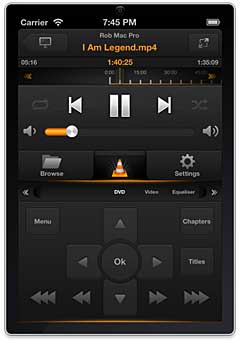
The current version of VLC is 2.0.5. It supports now DLNA and works fine with the Serviio DLNA server (see contribution on the Serviio Forum). A remote control for the VLC player to run on iOS devices is available from Hobbyist Software. The log files are displayed in the Tools > Messages window if verbosity is set to the value 2 (debug).

With VLC, cuttingt videos is very easy. Launch VLC media player and activate advanced controls located under the view menu. You will see four extra buttons above the normal play/pause button. You will not cut the video, but rather record the segment using the built-in VLC recorder. First seek the position you want to start your recording with the frame by frame button, then press the record button and the play button. The background color of the record button will change to blue. Press the record button when you want to stop the recording. The clip will be automatically saved as an MP4 media file in your Videos folder in Windows. A prefix “vlc-record-date-time” is added to the name of the original videoclip.

Simple DB : Amazon database

Today I installed a simple database on the Amazon Webservices. Amazon SimpleDB is a web service providing the core database functions of data indexing and querying in the cloud. This service is available in Europe since a few weeks. This allows to achieve lower latency, operate closer to other resources like Amazon EC2, Amazon S3, and Amazon SQS in the EU Region, and help meet EU data storage requirements when applicable.

Simple DB is simple to use, low touch, scalable, highly available, fast, flexible, inexpensive and designed for use with other Amazon Web Services.

The prices are:

  • First 25 Amazon SimpleDB Machine Hours consumed per month are free
  • $0.154 per Amazon SimpleDB Machine Hour consumed thereafter
  • First 1 GB of data transferred in per month is free
  • $0.100 per GB – all data transfer in thereafter
  • First 1 GB of data transferred out per month is free; thereafter:
  • $0.170 per GB – first 10 TB / month data transfer out
  • $0.130 per GB – next 40 TB / month data transfer out
  • $0.110 per GB – next 100 TB / month data transfer out
  • $0.100 per GB – data transfer out / month over 150 TB

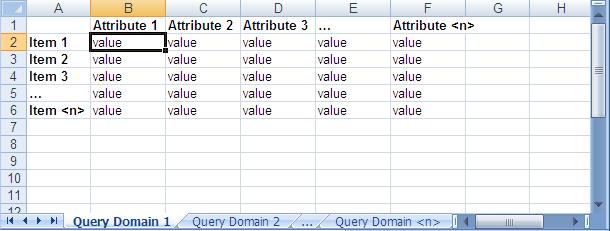
When using Amazon SimpleDB, you organize your structured data in domains within which you can put data, get data, or run queries. Domains consist of items which are described by attributename-value pairs. The spreadsheet model shown in the following image explains the structure:

Amazon Simple DB Data Model

Amazon Simple DB Data Model

Update your Twitter picture with Snapatar

Snapatar lets you update your Twitter profile picture using your webcam. Simply snap a picture, fill out your Twitter details and send the new image to Twitter. You can do this as often as you like. Your creativity is the limit.

Snapatar was designed by Roy Tanck, a free lance webdesigner, geek, entrepreneur and WordPress enthusiast from the Netherlands. He is the co-author of  the book  Byte-size Flash MX which deals with optimizing Flash files. He is also the developer of the FlickR and Photo widgets.