eBay API

Today, I registered for an eBay Development account. The eBay Developers Homepage provides support, documentation, code samples, API keys, affiliate programs, forum, sandbox, tools, release notes and system announcements.

A sandbox key and a production key can be generated on the personal account page. There are different API’s available : shopping, merchandising, feedback, trading, client alerts, large merchant services, platform notification, research. The developer center is segmented in Windows, Java, php, Javascript, Flash and other. The eBay community codebase contains several open-source projects.

I started using the shopping API (view guide) which is optimized for response size, speed and usability. This API allows to search for eBay items, products and reviews, user info, and popular items and searches. You are able to retrieve public eBay data in a buyer-friendly view, for easy consumption by buyer-focused applications. The call reference (version 613) of the eBay shopping API is available on the following link. The call “FindItemsAdvanced” is the most useful and enables you to search for items on eBay based on many possible input fields and filters. Detailed informations are available here.

Google Analytics API launched

On april 21th, Google announced that the Google Analytics Data Export API beta is now publicly available to all Analytics users. The API will allow developers to extend Google Analytics in new and creative ways that benefit developers, organizations and end users.

A list of featured examples from Google customers is available at the Google developer website. All the documentation needed to use the API is found on the same website.

FeedBurner

FeedBurner is a Chicago-based company that provides media distribution and audience engagement services for blogs and RSS feeds. Its Web-based tools, including an extensive feed and blog advertising network, help publishers promote, deliver, and monetize their content on the Web and make feed-based content more accessible and manageable for its end users. In 2007, FeedBurner was acquired by Google.

A FeedBurner Blog is available at the Google website. FeedBurner Stats is Google’s analytics offering for blogs, websites and feeds of all kinds. The service is free with every FeedBurner feed and provides publishers with a comprehensive view of their audience.

The FeedBurner Stats service for feeds provides the following feed-related information:

  • Subscription data (e.g. number of subscribers by day, previous week, last 30 days and all time) and Reach data (the estimated number of individuals clicking or viewing your feed content in a given day)
  • Breakdown of feed readers and aggregators, email services, web browsers and bots by which subscribers are accessing your content
  • Clickthrough tracking
  • Uncommon uses — sites where your content has been resyndicated including other blogs, directories and even spam sites
  • Item enclosure downloads (podcasts)
  • Live hits, conveniently translated to your local time zone

For even more insight, you can activate the following PRO features for no charge:

  • Reach
  • Item views

Today I activated FeedBurner for my Blog.

(http://feeds2.feedburner.com/InteractiveRichMedia)

RSS feeds about contemporary arts

I assembled the following list of handselected rss-feeds about contemporary art :

Luxembourg News :

Integrate rss feeds in a webpage

Last update : December 28, 2011
To integrate rss (Really Simple Syndication) feeds in a webpage, different technical solutions are available.

XSL Transformations

rss feeds are xml documents. To transform xml documents into another format like XHTML or HTML, XSL Transformations (XSLT) are used. XSL stands for Extensible Stylesheet Language. I tried this technique in 2006 with the artpet.lu website and I run into several problems with browser incompatibilities needing browser specific code selectors in the related javascript file.

Javascript widgets

A second possibility is to use a Javascript widget displaying the parsed rss data provided by a third party rss to HTML service.

The following list shows a few rss to javascript providers :

Flash Widgets

Some rss  to HTML providers offer Flash widgets to display the parsed rss data.

PHP

PHP coupled up with HTML is the favored method for showing RSS feeds on a website when it comes to search engine optimization.

Among the php scripts, Magpie RSS, published by Kellan Elliot-Mcrea under a GPL licence, is widely considered to be the most robust option, with SimplePie coming as a second best with the less restrictive BSD license and a few additional features. SimplePie is a fast and easy to use PHP library for parsing RSS and Atom, written by Ryan Parman and Geoffrey Sneddon. There are a number of alternative RSS-Libraries for PHP, including lastRSS.php, PEAR::XML_Feed_Parser, PEAR::XML_RSS, rss2array and PHP RSS News Parser.

I installed SimplePie on my hosted webserver a few years ago. The provided testscript to ensure that the basic requirements have been addressed by the server and that you have everything you need to run SimplePie properly is very helpful.

simplepie

simplepie

I use the php technique at the www.lesliesartgallery.eu website.

Late 2011, I prefer the Google Feed API solution to quickly integrate feeds on my websites.

Google Website Optimizer

Google recently launched the Website Optimizer, a tool that can help you improve the effectiveness of your website by allowing you to test different versions of your site content to determine what will best attract users.

Website Optimizer uses two types of testing: A/B testing and multivariate testing.

An A/B experiment allows you to test the performance of two (or more!) entirely different versions of a page. You can change the content of a page, alter the look and feel, or move around the layout of your alternate pages; there’s plenty of design freedom with A/B testing.

Multivariate tests, on the other hand, allow you to test multiple variables — in this case, sections of a page — simultaneously. For example, you could identify the headline, image, and promo text as parts of your page you’d like to improve, and try out three different versions of each one.

A/B experiments are the simpler version of testing with Website Optimizer. Experiments can run on many webpages of a website.

Website Optimizer needs a Google Analytics Account, because it uses the same powerful tracking technology that is used in Google Analytics to collect experiment data. The performance of experiment pages won’t be impacted, with the possible exception of the very first page-load after you have added the tracking code.

A quick start guide is available at the Google site. Different test strategies are possible (time on page,  conversions, clicking rates, landing pages, …).

Website Optimizer scripts will fail W3C validation because they meet browser requirements which do not strictly adhere to the W3C guidelines. There is no workaround available for these errors.

Understanding Google Analytics

During the creation of a new website, I was able to have a closer look on the internal working of Google Analytics. Four computers were used to test the first layout of the new website connected to three different IP adresses. The setup was the following :

  • PC 1 : Windows XP, screen resolution 1024 x 768, three browsers : IE 8.0.6001, Firefox 3.08, Chrome 1.0.154.153
  • PC 2 : Windows XP, screen resolution 1024 x 768, three browsers : IE, Firefox, Chrome
  • PC 3 : Windows XP, screen resolution 1280 x 1024, browser IE
  • PC 4 : Windows Vista, screen resolution 1280 x 800, browser IE

Google Analytics reported 18 visits from 8 unique visitors during two days, which is correct if every used browser is considered as a unique visitor (use of cookies). The reported screen resolutions, operating systems, browser versions and flash versions were correct.

The unique pageviews can not be higher than the total number of unique visitors, which was the case. The 18 visits were segmented in 8 visits from new visitors and 10 visits from returning customers.

Customer loyalty

Customer loyalty

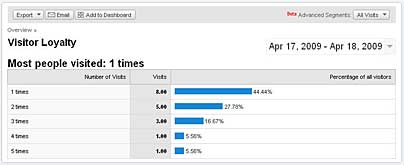
In the visitor loyalty report, the visits were indicated as :

  • 1 times : 8
  • 2 times : 5
  • 3 times : 3
  • 4 times : 1
  • 5 times : 1

Web Design : block and inline elements

Block elements take up the full width of the page and are naturally displayed on a new line. Block elements can not be nested within inline elements.

Examples of block elements :

  • <div>
  • <h1> … <h6>
  • <p>
  • <table>
  • <ul>, <ol>, <dl>
  • <li>, <dt>, <dd>
  • <form>

Inline elements only take up as much width as is required to display the element and will not force a new line. A width or height will not displayed on an inline element.

Examples of inline elements :

  • <span>
  • <img>
  • <a>
  • <strong>
  • <em>

With the CSS command “display: inline” block elements can be altered to behave as inline elements. By floating these elements, it will give the appearance of an inline element  but will also allow you to style them as if they were block elements. Therefore width and height can be applied to float’s successfully irrespective of whether the element has a default display of block or inline which is the reason why float’s are used so much in web design.

Target audience for an artgallery website

In marketing and advertising, a target audience, or target group is the primary group of people that something, usually an advertising campaign, is aimed at appealing to. The same rules apply for a website. The target audience for the website of an artgallery are art collectors, artists and art lovers.

To design a new website tailored to the preferences of this target audience, you have to identify the profile of these people, which is not an easy task. A first approach is to analyse the profile of the visitors of the old website, assuming that it reflects the typical profile of the target audience.

The following data sources can be explored to get useful informations :

  • Google Analytics (if installed on the website)
  • Alexa (web traffic metrics)
  • Quantcast

The Google Analytics report for an artgallery website, operational since more than 3 years, provides data from more than 4 million pageviews, 3 million visits and 2.3 million unique visitors, which is quite impressive and representative.

The  results from the analysis for the browser capabilities are the following:

Browser types:

  • IE : 75,6%
  • Firefox : 18,2%
  • Safari : 5,1%
  • others: 1,1%

Operating Systems:

  • Windows : 91,8%
  • MacIntosh: 7,5%
  • Linux: 0,5%
  • others: 0,2%

Screen Resolutions:

  • lower or equal 800 pixel horizontal: 7,2%
  • 1024 x 768 pixel: 43,5%
  • higher or equal 1152 pixel horizontal: 49,3%

Flash support:

  • Flash 10: 20% (augmenté à 40% les trois derniers mois)
  • Flash 9: 64,4%
  • Flash 8 or less: 15,6%

Java support:

  • yes: 98,3%
  • no: 1,7%

Traffic sources :

  • Direct traffic : 58,2%
  • Refering sites : 40,1%
  • Search Engines : 1,1%

Key search terms : women in art, artgallery, digital art

Number of recurring visitors (more than 9 visits in 3 years): 31.326

Number of very loyal visitors (more than 200 visits in 3 years) : 2.891

The Web Information Company Alexa provides the following metrics (Demographics) for the website:

  • Age : Relative to the general internet population, 55-64 year olds are greatly over-represente
  • Gender : Relative to the general internet population, Females are over-represente
  • Education : Relative to the general internet population, people who went to graduate school are over-represented
  • Location :  Relative to the general internet population, people browsing from home are over-represented
  • Key search terms :  video,  alice, women in art, digital art

Quantcast provides following informations : This site reaches approximately 12,614 U.S. monthly people. The site attracts a 50+, somewhat wealthy, rather female, more educated group.