
Last update : November 17, 2015
The Synology DSM 5.0 operating system uses the database PostgreSQL version 9.3 for Photostation 6.0 which can be administered with phpPgAdmin.
The Synology phpPgAdmin package created by Nigel Barnes (alias Pernod 70) has been updated on March 31, 2014 to work with the new Synology DSM version 5.1. The new package version is 5.1.0-002, the sources are available at Github.
The following configuration files are used :
by phpPgAdmin
- /usr/syno/synoman/phpsrc/phpPgAdmin/conf/config.inc.php
- /usr/syno/synoman/phpsrc/phpPgAdmin/conf/config.inc.php-dist
by PosrtgreSQL
- /etc/postgresql/pg_hba.conf
- /etc/postgresql/pg-ident.conf
- /etc/postgresql/postgresql.conf
- /etc.defaults/postgresql/pg_hba.conf
- /etc.defaults/postgresql/pg-ident.conf
- /etc.defaults/postgresql/postgresql.conf
config.inc.php
I named this configuration file phpPgAdmin in the Synology Config File Editor. The original content is show below :
config.inc.php-dist
This is a backup copy of the main configuration file config.inc.php.
pg_hba.conf
Client authentication in PostgreSQL is controlled by a configuration file, which traditionally is named pg_hba.conf (HBA stands for host-based authentication). I named this configuration file PostgreSQL in the Synology Config File Editor. The original content is show below :
# TYPE DATABASE USER ADDRESS        METHOD
local  all      all                 trust
host   all      all  127.0.0.1/32   trust
host   all      all  ::1/128        trust
A backup copy with these default values is stored in the /etc.defaults/ folder.
pg-ident.conf
The configuration file pg-ident.conf is used to map the operating system user name to a database user name if an external authentication system is involved. In the Synology setup this file and the backup copy stored in the /etc.defaults/ folder are empty.
postgresql.conf
The original content is show below :
hba_file = '/etc/postgresql/pg_hba.conf'
ident_file = '/etc/postgresql/pg_ident.conf'

external_pid_file = '/run/postgresql/postmaster.pid'

listen_addresses = '127.0.0.1'
max_connections =64

shared_buffers = 24MB

log_destination = 'syslog'
syslog_ident = 'postgres'
client_min_messages = notice
log_min_messages = warning
log_min_error_statement = error
log_min_duration_statement = -1

track_activities = off
track_counts = off

autovacuum = off

datestyle = 'iso, mdy'
lc_messages = 'C'
lc_monetary = 'C'
lc_numeric = 'C'
lc_time = 'C'

escape_string_warning = off
synchronize_seqscans = off

standard_conforming_strings = off
A backup copy with these default values is stored in the /etc.defaults/ folder.
Configuration
Out of the box with the default configuration parameters, the login to the PostgreSQL database with the phpPgAdmin app works with the username postgres and an empty password.
After an update or upgrade of the DSM operating systme, the phpPgAdmin webpage (http://yourdomain/phpPgAdmin/) is usually no longer accessible. You must reinstall the 3rd party phpPgAdmin installation package with the following steps :
- deinstall phpPgAdmin
- set the confidence level in parameters to the required 3rd party installation
- install manually the latest phpPgAdmin package
- check the configuration files with the configuration editor (mainly the extra_login_security parameter which I set to false in the config-file named phpPgAdmin)
- Start the phpPgAdmin package in the package center
- Go to the phpPgAdmin webpage, enter the default login credentials and verify your databases
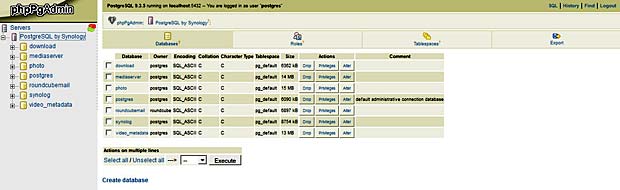
PostgreSQL database management with phpPgAdmin on Synology
The last update of the Synology System was done on November 17, 2015, followed by a new installation of phpPgAdmin.
Export
To export the Photo PostgreSQL database for backup purposes, I select the photo database, click the tab “Export” in the menu bar, select “Structure and Data” with the Format “SQL”, chose the option “download” and finally click the button “Export”. The file is saved with the name “dump.sql” in the standard local download folder.
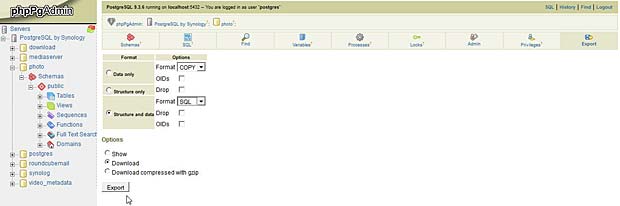
Export PostgreSQL Synology photostation database with phpPgAdmin
Links
A list with links to sources providing additional informations about the Synology PostgreSQL database is shown hereafter :
- Synology Forum : Connecting to the PhotoStation’s database
- Synology Forum : Installed phppgadmin as 3rd-party application
- Synology wiki.de : PhpPgAdmin als 3rd-Party Applikation
- Kristalsoft blog : Installation de phpPgAdmin sur un DiskStation
- Community package hub : phpPgAdmin
- JosDBlog : Synology Photo Station et commentaires
- NAS storage blog : Dump and restore databases easily with PostgreSQL
- Synology support : Comment puis-je changer le mot de passe root de MariaDB/MySQL ?